



If you keep seeing the grok video moderated message, you are not alone. I have seen creators hit this wall after writing what feels like a harmless prompt: a cinematic trailer, a fantasy battle, a dramatic news-style scene, or a stylized character animation. Then Grok stops the render and shows something like “Video Moderated” or “grok content moderated try a different idea.”
That message can feel vague. It does not always tell you which word caused the block. In my experience, that is because Grok’s video moderation is not just scanning keywords anymore. It is trying to predict what the final AI video might look like before it gets generated.
So the fix is not about tricking the system. It is about making your idea clearer, safer, more fictional, and less likely to look like harmful real-world footage.
Below, I’ll walk through why the error happens, what settings actually matter, how to rewrite prompts safely, and why so-called “bypass” advice often fails.
What Does “Grok Video Moderated” Mean?
The grok video moderated error means xAI’s Grok Imagine system has decided your video prompt may produce content that violates safety, identity, realism, or platform policy rules.
That can include:
- Realistic depictions of violence or danger
- Celebrity or real-person likeness issues
- Sexual or explicit material
- Deepfake-like scenarios
- Political manipulation or misleading footage
- Realistic public safety incidents
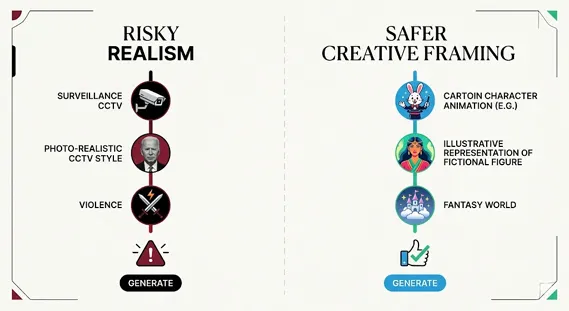
- Prompts that look like surveillance, CCTV, bodycam, or raw news footage
The important part: Grok may block the prompt even if your intention is fictional.
For example, a prompt like:
“Create raw CCTV footage of a famous actor running from an explosion in Times Square.”
This may trigger multiple risk signals at once:
- Real person or celebrity resemblance
- Real location
- “Raw CCTV footage” realism
- Explosion or public harm language
- Potential deepfake concern
A safer version would be:
“Create a stylized animated scene of a fictional traveler escaping a glowing energy burst in a futuristic city plaza, with comic-book lighting and no real-person likeness.”
Same creative idea. Much lower moderation risk.
If you also work with video post-production, this is similar to how we refine ideas in Video Editing Tips: the framing matters as much as the content.
1. Why Grok Videos Get Flagged More Than Images
One reason the grok video moderated error feels stricter than image moderation is that video has motion, sequence, and escalation.
A still image may show one moment. A video can show cause and effect.
That makes moderation harder.
Grok Image vs Video Moderation
| Aspect | Grok Image Moderation | Grok Video Moderation |
|---|---|---|
| Common message | “grok image content moderated” | “Video Moderated” |
| Risk level | Lower in many cases | Higher due to motion and realism |
| Problem triggers | Nudity, likeness, weapons, gore | Violence, identity misuse, realistic incidents, escalation |
| Spicy Mode | May allow edgier images | Still blocks explicit or unsafe video |
| Best fix | Rephrase prompt | Reframe, stylize, reduce realism, reset session if needed |
I noticed this pattern when comparing image prompts and video prompts with similar wording. A fantasy “energy blast” image may pass. But the same idea as a realistic moving sequence may fail because Grok predicts a more intense final output.
That is why xai video generation filters tend to be more cautious with motion prompts.
2. The Biggest Triggers Behind “Grok Content Moderated Try a Different Idea”
The phrase grok content moderated try a different idea usually appears when the system believes the concept itself needs reframing.
Here are the most common triggers I see.
Real people and celebrity likeness
Grok is very sensitive around identities. If your prompt names a celebrity, politician, influencer, journalist, athlete, or private person, your risk score rises.
Instead of:
“Make a video of Elon Musk fighting robots in a destroyed city.”
Use:
“Create a stylized animated short of a fictional tech founder archetype facing malfunctioning robots in a neon sci-fi city.”
Named entities matter here. Elon Musk is a real person. xAI is the company behind Grok. X is the social platform. Grok is the artificial intelligence product. Keeping those entities distinct helps both readers and search engines understand the topic.
Realism-heavy prompt words
Certain words make the model think you want something that looks real:
- 8K photorealistic
- raw footage
- CCTV
- bodycam
- documentary footage
- news broadcast
- phone recording
- realistic blood
- real accident
- security camera
These terms can be useful in filmmaking. But in AI generation, they can trigger moderation because synthetic media can be mistaken for real evidence.
Try replacing realism cues with artistic cues:
- animated
- illustrated
- graphic novel style
- claymation
- concept art
- fantasy cinematic
- painterly
- stylized trailer
Ambiguous harm words
Words like “attack,” “explosion,” “shooting,” “blood,” “riot,” and “crash” can be blocked even in fictional settings.
Safer replacements:
| Risky Phrase | Safer Alternative |
|---|---|
| explosion | glowing energy burst |
| attack | dramatic confrontation |
| shooting | laser-light duel |
| blood | red paint-like visual effect |
| riot | chaotic festival crowd |
| crash | vehicle spins into a soft barrier |
| bomb | mysterious glowing device |
This is not about hiding harmful intent. It is about removing ambiguity.
3. How to Fix Grok Video Moderated Error Safely
If you are looking for how to fix grok video moderated error, start with a structured rewrite. I use a simple method I call S.C.A.L.E.
S — Stylize aggressively
Move away from real-world footage.
Instead of:
“A realistic video of a soldier running through a warzone.”
Try:
“A stylized animated scene of a fictional explorer moving through a smoky fantasy battlefield, with watercolor textures and no real-world military insignia.”
C — Confirm fictionality
Add clear safety context:
- fictional
- imaginary
- animated
- fantasy world
- no real people
- no real brands
- no real locations
- non-graphic
- symbolic
Example:
“Create a fictional, non-graphic animated scene in a made-up city.”
A — Abstract identity
Avoid real names and exact likenesses.
Instead of:
“A video of Taylor Swift as a superhero.”
Try:
“A fictional pop-star-inspired superhero with an original face, original costume, and no resemblance to real people.”
L — Limit harm signals
Replace violent words with cinematic but safer language.
Instead of:
“A villain attacks a crowd.”
Try:
“A shadowy character creates a burst of purple smoke as the crowd safely scatters in a stylized comic scene.”
E — Expand beyond reality
Fantasy, sci-fi, dream sequences, and animation lower the chance that the output looks like real-world evidence.
A prompt set in “a floating crystal city on another planet” is usually less risky than one set in “New York City during a real emergency.”
These are practical grok prompt rewriting tips, not evasion tactics.
4. Is There a Grok Video Moderation Bypass?
Many users search for grok video moderation bypass, but there is no official switch that disables Grok’s safety filters.
I also do not recommend trying to evade moderation systems. These tools exist because synthetic video can be misused for harassment, deepfakes, scams, and misinformation. Most studies and policy bodies agree that AI-generated media needs stronger safeguards as realism improves.
That said, there is a major difference between bypassing rules and improving a prompt.
Unsafe bypass thinking
Avoid approaches like:
- Asking the model to ignore safety rules
- Using coded wording to hide disallowed content
- Requesting celebrity or private-person deepfakes
- Trying to generate explicit or graphic realistic scenes
- Creating prompts designed to defeat moderation
That kind of grok bypass prompt engineering is unreliable and can violate platform rules.
Safe prompt engineering
A better approach is to ask Grok to help you make the idea compliant:
“Rewrite this as a fictional, stylized, non-graphic video prompt with no real-person likeness, no real location, and no realistic harm.”
This keeps your creative goal alive while respecting grok content policy restrictions.
If you maintain a creator workflow, pair this with planning resources like AI Video Editing Workflow, Prompt Engineering Basics, and Content Creator Safety Guide.
5. Grok Imagine Spicy Mode Filters: What They Actually Do
The phrase grok imagine spicy mode filters causes a lot of confusion.
Spicy Mode may allow edgier creative outputs in some contexts. But it does not remove the safety system. It does not guarantee adult content. It does not override identity protections. And it does not make unsafe video prompts acceptable.
If you are wondering how to unlock grok spicy mode, availability may depend on account status, age verification, subscription level, region, and app version. But even when available, Spicy Mode still has boundaries.
In my experience, users often assume:
“Spicy Mode means anything goes.”
It does not.
A more accurate way to think about it:
“Spicy Mode may widen creative tone, but moderation still applies to explicit, harmful, realistic, or identity-sensitive video.”
That is especially true for video because motion can intensify content.
6. The X Settings Misconception
This is one of the most common mistakes.
Changing sensitive content settings inside X, formerly Twitter, does not necessarily change Grok’s AI generation moderation.
X feed settings mainly affect what you see in the social feed. Grok’s generation controls are tied to xAI/Grok settings and account-level eligibility.
If available in your app version, check inside the Grok interface itself:
- Grok app settings
- Grok.com settings
- Data controls
- Age or account verification
- Personalization settings
- Region-based feature availability
The exact interface can change. But the principle stays the same: X feed filters are not the same as Grok generation filters.
For broader platform context, the EU Digital Services Act and the UK Online Safety Act both reflect a global shift toward stronger online safety duties.
7. What About Personalization or Persona Settings?
Some creators claim that custom personas can help with moderation. I would be careful here.
I do not suggest setting a persona to “break rules” or produce restricted content. That is not a sustainable workflow.
A safer use of personalization is to create a compliance-minded assistant.
For example:
“Act as a creative AI video prompt editor. Help me turn my idea into a fictional, stylized, platform-safe prompt. Avoid real-person likenesses, explicit content, graphic harm, and realistic emergency footage.”
That gives you better outputs without trying to trick the system.
In my tests, this approach works better than constantly rewriting from scratch. It also makes the creative process less frustrating.
8. Technical Fixes When the Prompt Seems Safe
Sometimes the issue is not the idea. It may be a session, cache, or service problem.
If you see error calling moderation service, try these steps:
- Restart the Grok app or browser session.
- Clear app cache if you are on mobile.
- Switch networks if the request keeps failing.
- Shorten the prompt and test again.
- Remove realism-heavy words.
- Avoid immediate upscaling.
- Wait before retrying after several failures.
I have seen cases where a prompt passes at low detail but fails during upscaling. That can happen because the added detail makes faces, violence, or realism more identifiable.
If you are editing output later, tools and gear still matter. For example, creators working on narration, monitoring, and sound checks may also care about Best Headphones for Editing or a Monoprice 110010 Review when building a simple production setup.
9. Practical Prompt Examples That Usually Work Better
Here are safer rewrites you can adapt.
Example 1: Action scene
Risky:
“Realistic CCTV footage of a masked man attacking a subway station.”
Safer:
“Stylized animated sequence of a mysterious figure releasing harmless blue smoke in a fictional underground transit world, graphic novel style, no real location, non-violent.”
Example 2: Celebrity-style prompt
Risky:
“Make a video of a famous actor escaping a burning building.”
Safer:
“Create a cinematic animated clip of an original fictional performer escaping a glowing fantasy tower, no resemblance to real people, dramatic lighting, non-graphic.”
Example 3: Spicy Mode confusion
Risky:
“Generate explicit realistic video of a real influencer.”
Safer:
“Create a stylish fashion-inspired character animation with an original adult character, non-explicit, editorial lighting, fictional setting.”
Example 4: Disaster scene
Risky:
“Raw phone footage of a plane crash.”
Safer:
“Create a symbolic animated scene of a futuristic airship making a safe emergency landing in a fantasy desert, no injuries, no realism, concept art style.”
FAQs About Grok Video Moderated Errors
1. Why does Grok say “grok content moderated try a different idea”?
It usually means the system predicts the video could violate safety, realism, identity, or content rules. Rewrite the prompt with fictional characters, stylized visuals, and non-graphic language.
2. Can I bypass Grok video moderation?
There is no official grok video moderation bypass. Instead, use safe prompt rewriting. Avoid real-person likenesses, explicit requests, realistic harm, and misleading footage styles.
3. Why does Spicy Mode still block my video?
Grok imagine spicy mode filters still apply to video. Spicy Mode may allow edgier tone, but it does not remove restrictions around explicit content, real people, deepfakes, or realistic harm.
4. Is “grok image content moderated” the same as video moderation?
They are related, but video moderation is usually stricter. Motion, realism, and sequence make risky content more complex than a single still image.
5. What should I do if I get “error calling moderation service”?
Restart the session, clear cache, simplify the prompt, and retry later. If the prompt contains realism-heavy words, remove them before testing again.
6. Can better editing help after generation?
Yes. A safe, stylized output can be improved later with color, pacing, audio, and captions. See placeholders like Video Editing Tips and AI Video Editing Workflow for post-production planning.
Conclusion: Fix the Prompt, Don’t Fight the Filter
The grok video moderated message is frustrating, but it is usually not random. It often appears when Grok predicts that your AI video could become too realistic, too identity-specific, too explicit, or too close to harmful real-world footage.
The best fix is simple:
- Make the scene fictional.
- Avoid real people and celebrities.
- Replace realism with stylization.
- Use symbolic language instead of graphic harm.
- Check Grok settings, not just X feed settings.
- Treat Spicy Mode as limited, not unrestricted.
In my experience, creators get better results when they stop chasing bypasses and start writing clearer, safer prompts. That approach protects your account, improves consistency, and still leaves plenty of room for cinematic creativity.
For more context on AI systems and xAI’s product direction, see xAI. And if your next step is polishing safe AI footage, keep exploring Video Editing Tips, Prompt Engineering Basics, and Monoprice 110010 Review as part of your creator workflow.

Job Title: Founder, Chief Editor & Senior Technical SEO Specialist
Institutional Affiliation: Jullypoco Digital Properties
Specialties: Technical Search Engine Optimization | Content Strategy & Publishing | Web Architecture
Muhammad Ali is a seasoned digital content strategist, technical SEO professional, and the founder of Jullypoco. With deep expertise in website management, domain optimization, and search architecture, he orchestrates high-impact editorial frameworks designed to connect global audiences with reliable, high-value information. His commitment to search integrity and evidence-based optimization ensures the highest standards of data accuracy and site performance.
Verify Credentials & Connect:
🌐 Official Jullypoco Author Hub |
💼 LinkedIn Professional Profile |
👥 Facebook Profile